


Last updated: 24 October 2026
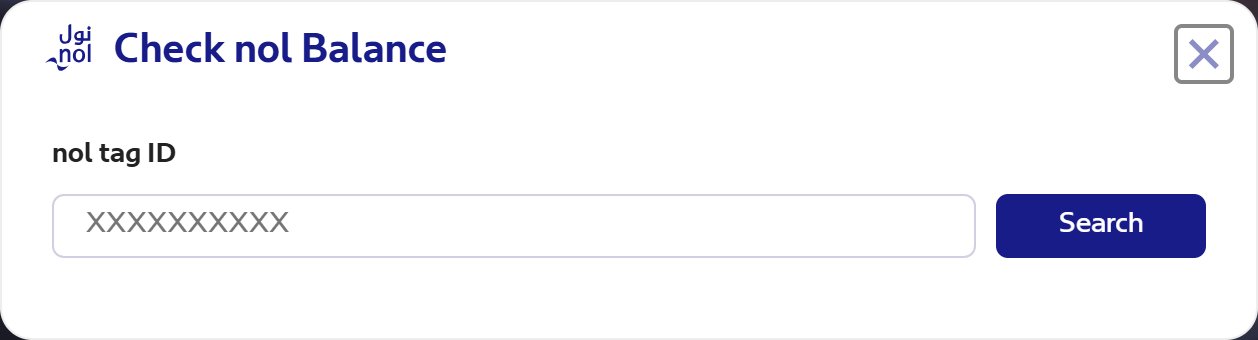
A nol card balance check takes less than a minute: type the 10-digit nol tag ID from the back of your card into the Check nol Balance box on the RTA website, or hold the card against your phone in the nol Pay app. Both are free and work for silver, gold and blue cards.
The website shows your balance, any pending top-up and the card’s expiry date. The app reads the card itself, so it shows the live figure. This guide covers every method, the minimum balance you need to pass the metro gates, and what to do when a top-up does not show.
Nol card balance check: 5 ways compared
The fastest route is the nol Pay app if your phone has NFC, and the RTA website if it does not. The table shows what each method needs.
| Method | What you need | What you see | Best for |
|---|---|---|---|
| RTA website | 10-digit nol tag ID | Balance, pending top-up, expiry date | Any phone or computer |
| nol Pay app | Phone with NFC, the card in hand | Live balance, card details, history | Daily metro and bus users |
| RTA Dubai app | Tag ID, or the card and NFC | Balance | People who already use the app for fines and parking |
| S’hail app | UAE Pass login, the card and NFC | Card info, and it activates pending top-ups | Journey planning plus balance in one app |
| Metro ticket vending machine | The card | Balance on screen | When you are already at the station |
How to check your nol balance on the RTA website
The RTA website method needs no login and no app. It is the official route RTA itself points to, alongside the nol Pay app.
- Open rta.ae and scroll to the row of service tiles under the main banner.
- Click Check nol Balance.
- Type the 10-digit nol tag ID printed on the back of your card.
- Press Search.
The result shows three things: your current balance, any pending credit that has been paid online but not yet loaded onto the card, and the card’s expiry date. Recent trips may be missing, because the online figure can leave out transactions from the past 48 hours. If you travelled today, the real balance on the card is probably lower than the website shows.
Check the balance in the nol Pay app
The nol Pay app reads the balance straight from the card’s chip, so it is the most accurate method. It is RTA’s official app for nol cards, available on the App Store, Google Play and Huawei AppGallery.
- Install nol Pay and choose your language.
- Log in with UAE Pass or your RTA account, or continue as a guest with your mobile number and a one-time code.
- Tap Check card info.
- Hold the nol card flat against the back of your phone, near the NFC area, until the app reads it.
The app then shows the balance, the card details and recent transactions. In practice, many expats in the UAE keep nol Pay on their phone for this alone, because it also tops up the card instantly: when you top up by scanning the card and tapping it a second time, the new credit is active straight away.
NFC must be switched on in your phone settings. If the app cannot read the card, remove any thick phone case and hold the card still for a few seconds.
Use the RTA Dubai app or the S’hail app
Both apps can check a nol card, which saves installing another app if you already have one of them.
RTA Dubai app
Open the app, sign in with UAE Pass or continue as a guest, then go to Services, nol and the balance check option. Enter the 10-digit tag ID or scan the card with your phone. Note that a top-up made in this app by typing the tag ID stays pending until you activate it, and the minimum top-up here is AED 30.
S’hail app
S’hail is RTA’s journey planner. Log in with UAE Pass, tap Check Card Info, then hold your card against the phone and wait for the app to read it. If the card has a pending top-up, this step also activates it.
Check at a metro station ticket machine
Every Dubai Metro station has ticket vending machines that read nol cards. Place your card on the machine’s card reader and the balance appears on the screen before you choose to top up.
Keep in mind that since 1 March 2025 the minimum top-up at metro ticket vending machines is AED 20, paid in one go with a single payment method. You cannot split it between cash and a bank card. If you only need a few dirhams, the apps and tram station machines accept smaller amounts.
Where to find your nol tag ID
The nol tag ID is the 10-digit number printed on the back of your nol card. You need it for the RTA website and for any top-up where you type the number instead of scanning the card.
- Type all 10 digits with no spaces.
- Save the number in your phone notes. If the card is lost and was registered, RTA can protect the remaining balance.
- Paper red tickets have no stored balance to check. They carry single trips, up to 10 at a time.
Pending balance vs active balance
Online top-ups do not reach your card straight away. They sit as pending credit until you activate them, and that is the most common reason a balance looks wrong.
RTA’s central ticketing system needs 45 minutes to 4 hours to send the top-up to gates, machines and phones. After that, one tap on an activating channel loads it onto the card.
| Where you topped up | Activation needed? | When you can use it |
|---|---|---|
| Ticket vending machine, ticket office, solar top-up machine, authorised sales agent | No | Immediately |
| nol Pay, S’hail or RTA Dubai app by scanning the card (NFC) | No | Immediately, after the second tap |
| RTA website or Mahboub chatbot | Yes | After 45 minutes to 4 hours, once activated |
| RTA Dubai, S’hail or Dubai Now app by typing the tag ID | Yes | After 45 minutes to 4 hours, once activated |
| Bank apps (Emirates NBD, Emirates Islamic, ADCB) | Yes | After 45 minutes to 4 hours, once activated |
To activate a pending top-up, use one of these:
- Scan the card in nol Pay, S’hail or Dubai Now.
- Tap the card at any metro gate. If you are not travelling, check in and check out within 2 minutes so no fare is charged.
- Insert or tap it at an RTA parking meter or a solar top-up machine at a bus stop.
Bus card readers cannot activate pending credit, so activate it before you board. You have 180 days from the top-up date, and RTA sends an SMS and email reminder if the amount is still pending.
Minimum balance and minimum top-up
You need at least AED 7.50 on a silver or gold nol card to use public transport, and the metro gates will not open below that. For the blue personal card, RTA lists AED 3.50 at metro gates.
The minimum top-up depends on where you pay. These are RTA’s figures as of September 2026.
| Top-up channel | Minimum top-up |
|---|---|
| nol Pay app, S’hail app, Mahboub chatbot, RTA website | AED 5 |
| Solar top-up machines, authorised sales agents, bus station machines | AED 5 |
| Dubai Now app | AED 20 |
| Ticket vending machine in a metro station | AED 20 |
| RTA Dubai app | AED 30 |
| Ticket office in a metro station | AED 50 |
A few limits also apply. One online top-up can be at most AED 150. An anonymous silver or gold card can hold up to AED 1,000, and a registered or personal card up to AED 5,000. Topping up is free; RTA charges no service fee, although a bank may add its own fee in its app.
Digital nol card on Samsung and Huawei phones
A digital nol card lives in your phone wallet instead of on plastic, and you check and top it up in the nol Pay app. RTA supports it only on compatible Samsung and Huawei phones and on the Huawei Watch 3 and 3 Pro.
- Only silver and gold cards can be moved to a phone, and the plastic card stops working once the transfer is complete.
- Apple Wallet does not support digital nol cards, so iPhone users keep the plastic card and use nol Pay to read it.
Which nol card do you have?
All nol cards except the red ticket store a balance that you can check. The card type also decides the fare and the maximum balance.
| Card | Price | Credit included | Maximum balance | Notes |
|---|---|---|---|---|
| Silver | AED 25 | AED 19 | AED 1,000 (AED 5,000 once registered) | Standard card, sold at any ticket office |
| Gold | AED 25 | AED 19 | AED 1,000 (AED 5,000 once registered) | Gold class on the metro and tram, higher fare |
| Blue (personal) | AED 70 | AED 20 | AED 5,000 | Carries your name; concession fares for students and seniors, free travel for people of determination |
| Red ticket | AED 2 | None | Up to 10 single trips | Paper ticket for occasional trips |
If you ride the metro most days, registering your silver or gold card online is worth the few minutes it takes. It protects your balance if the card is lost.
Common problems and how to fix them
- The website balance is higher than expected. Trips from the past 48 hours may not be included yet. Scan the card in nol Pay for the live figure.
- You topped up but the balance did not change. The amount is probably pending. Activate it at a metro gate or in nol Pay after 45 minutes to 4 hours.
- The metro gate will not open. Your balance is below AED 7.50. Top up at the station machine (AED 20 minimum) or in an app (AED 5 minimum).
- You were charged more than the trip should cost. This usually means you forgot to tap out. Always check out at the gate or the bus reader. RTA has an overcharge refund claim for these cases.
- The card has expired. A pending top-up is not added to an expired card. Ask for a refund through the RTA website, nol Pay, a self-service machine or a ticket office machine.
- You lost a blue card. Call RTA on 800 9090 straight away to report it.
Look after the card itself too. Keep it out of your back pocket, where sitting on it can damage the chip, and hold only one card over a reader at a time.
Frequently asked questions
How do I check my nol card balance online?
You can check your nol card balance online on the RTA website by entering the 10-digit nol tag ID from the back of the card in the Check nol Balance box on the homepage. The result shows your balance, any pending top-up and the card’s expiry date. Transactions from the last 48 hours may not appear yet, so recent trips can be missing.
Can I check my nol card balance on my phone?
Yes, you can check your nol card balance on your phone with the nol Pay app, the official RTA app for nol cards. Tap Check card info and hold the card against the back of a phone with NFC, and the app reads the live balance from the card. The RTA Dubai and S’hail apps can also read the card.
Why is my nol card balance not updated after a top-up?
Your nol card balance is not updated because top-ups made on the RTA website, through the Mahboub chatbot, in bank apps or by typing the tag ID stay pending until you activate them. Wait 45 minutes to 4 hours, then tap the card at a metro gate, parking meter or bus stop solar machine, or scan it in nol Pay. Bus readers cannot activate it.
What is the minimum balance on a nol card to travel?
The minimum balance to travel on Dubai public transport with a silver or gold nol card is AED 7.50, and the metro gates will not open below it. RTA lists AED 3.50 for the blue personal card at metro gates. Topping up before the balance gets that low saves you a queue at the ticket machine during rush hour.
What is the minimum nol card top-up at a metro station?
The minimum nol card top-up at a Dubai Metro station is AED 20 at the ticket vending machines and AED 50 at the ticket office. Smaller top-ups from AED 5 are possible in the nol Pay and S’hail apps, on the RTA website and at solar top-up machines, so use those when you only need a little credit.
How do I get my balance back from an expired nol card?
You get the balance back from an expired nol card by submitting a refund request through the RTA website, the nol Pay app, a self-service machine or a ticket office machine. The same applies to a pending top-up that was never activated, because RTA does not add pending credit to an expired card. RTA’s refund terms and conditions apply to every request.
Key takeaways
- For a quick nol card balance check, enter the 10-digit tag ID on rta.ae or scan the card in the nol Pay app.
- The website can lag by up to 48 hours; the app reads the live balance from the card.
- Online top-ups stay pending until you tap the card at a metro gate or scan it in nol Pay, and bus readers cannot activate them.
- You need at least AED 7.50 to pass the metro gates with a silver or gold card.
- Metro machines take a minimum of AED 20 and ticket offices AED 50; the apps and the website accept AED 5.
- Digital nol cards work only on compatible Samsung and Huawei devices, not in Apple Wallet.