


Last updated: 24 October 2026
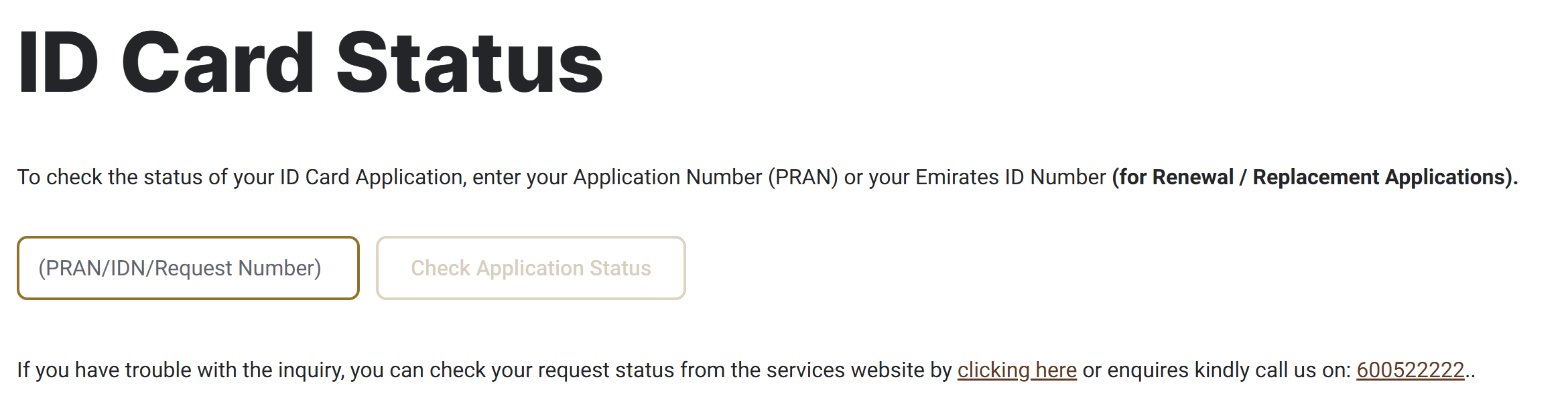
An Emirates ID status check takes less than a minute on the ICP website: enter your application number (PRAN) or, for a renewal or replacement, your Emirates ID number, and press Check Application Status. It is free and needs no login.
You can also follow the application in your ICP account or the UAEICP app, search the 010 application number on the ICP smart services site, or call ICP on 600522222. This guide explains each method, which number to use, what happens once the card is printed, and what to do if your status does not move.
Emirates ID status check: 4 ways compared
The quickest route is the ICP status page, because it needs only one number. The others suit people who applied through their own account or who cannot find their number.
| Method | What you need | Best for |
|---|---|---|
| ICP ID Card Status page | PRAN, or your Emirates ID number for a renewal or replacement | Everyone, no login |
| Your ICP account or the UAEICP app | UAE Pass or ICP login | People who applied themselves online |
| ICP smart services website | Application number starting with 010 | Applications made through a typing centre |
| ICP call centre | Any of your application details | When the number is not recognised online |
How to check your Emirates ID status on the ICP website
The ICP status page is the official tracker for new cards, renewals and replacements in every emirate. It works on a phone or a computer.
- Open the ID Card Status page on the ICP website.
- Type your number in the PRAN/IDN/Request Number box. Use the application number (PRAN) for a first card, or your Emirates ID number if you are renewing or replacing a card.
- Press Check Application Status.
- Read the status shown. If the page cannot find your application, try the smart services site or call ICP, both explained below.
Type the number without spaces or dashes. In practice, most failed searches come from using the wrong number: a first-time applicant has no Emirates ID number yet, so only the PRAN or the application number will work.
Track in your ICP account or the UAEICP app
If you applied yourself through ICP’s online services, your account shows every request and its status. ICP lists this as the first tracking method in its FAQ.
- Log in to the ICP smart services website or the UAEICP app, for example with UAE Pass.
- Open My Applications or My Requests.
- Find the Emirates ID request in the list to see its current status.
The UAEICP app is ICP’s official app on Android and iOS. Many expats in the UAE keep it on their phone anyway, because it also holds the digital version of the card once it is issued.
Track with your 010 application number
An application filed at a typing centre may not appear in your personal account, but you can still track it. ICP’s smart services site has an application tracking option that works with the application number alone.
- Go to smartservices.icp.gov.ae.
- Choose the application tracking option.
- Enter your application number, which starts with 010.
- Click Search to see the status.
The 010 number is printed on the application receipt or form the typing centre gives you. Keep a photo of that paper on your phone until the card is in your hand.
Call ICP on 600522222
The ICP call centre can give you an update when the online tools cannot find your application. Call 600522222 from inside the UAE or +971 600522222 from abroad, and have your application number, passport number and Emirates ID number (if you have one) ready.
For complaints about a delayed or rejected application, ICP also runs a complaints and enquiries platform at cc.icp.gov.ae.
Which number do you need?
Three different numbers can track an Emirates ID application, and the right one depends on the type of request.
| Number | What it is | Where to find it | Use it for |
|---|---|---|---|
| PRAN | Application number for an ID card application | On the copy of your Emirates ID application form | First Emirates ID, on the ICP status page |
| Emirates ID number (IDN) | The ID number on your current card | Front of your existing card, or the digital ID in the app | Renewal or replacement, on the ICP status page |
| Application number starting with 010 | ICP request number | Receipt or form from the typing centre, or your ICP account | Tracking on the smart services website |
Since 2023 the registration form also carries a QR code. Scanning it shows the status and next steps, and lets you change your biometrics appointment.
What happens after your card is printed
Once the card is printed, ICP hands it to Emirates Post and you get an SMS and email with the expected delivery date and an Emirates Post tracking number. The message also names the post office where you collect the card.
- Enter the tracking number on the Emirates Post website or in the Emirates Post app to see when the card reaches the post office.
- Go to the named post office with a valid ID, such as your passport, and the ICP receipt from your application.
- Collect the card within 90 days of the Emirates Post SMS.
The 90-day limit matters. If you do not collect the card in time, Emirates Post returns it to ICP, which destroys it, and you must apply and pay for a replacement card.
Use your digital Emirates ID while you wait
After your ID card is issued, its electronic version appears in the UAEICP app and can also be used through UAE Pass. That helps when the plastic card is still at the post office and you need to show your ID.
Log in to the UAEICP app or UAE Pass to see it. Keep in mind that some offices still ask for the physical card, so collect it as soon as the Emirates Post SMS arrives.
Status not found or not moving: what to do
Most tracking problems have a simple cause. Work through these checks before you visit a service centre.
- “No record found” on the status page. Check that you used the right number for your request type. First cards need the PRAN or the 010 number, not a passport number.
- The application was made at a typing centre. It may not show in your own ICP account. Use the 010 number on the smart services site.
- The status has not changed for a long time. Your application may be waiting for biometrics (fingerprints and photo). ICP books an appointment for these visits, and the QR code on your registration form lets you change the date.
- The card was printed but no SMS arrived. Check that the mobile number on your application is correct, then call 600522222.
- The status still shows no progress after these steps. Call ICP or raise an enquiry on cc.icp.gov.ae with your application number.
Renewal deadlines and the late fine
Residents and GCC nationals can renew an Emirates ID during the last six months before it expires, or after it expires. UAE nationals can renew in the final year of validity.
There is a 30-day grace period after the expiry date. After that, a late renewal fine of AED 20 per day applies, up to a maximum of AED 1,000.
| Time since expiry | Late fine |
|---|---|
| Up to 30 days | None (grace period) |
| Each day after the grace period | AED 20 |
| Maximum total | AED 1,000 |
If you need the card urgently, ICP’s identity centres can issue, renew or replace it faster for an extra AED 150.
Lost, damaged or faulty Emirates ID
Report a lost card to ICP within 7 days of losing it, then apply for a replacement. You can apply through the UAEICP app, the ICP website, an authorised typing centre or a customer happiness centre, and the new card keeps the same expiry date as the old one.
If your card suddenly stops working, take it to an identity service centre. When the fault is a manufacturing defect, such as a damaged chip, ICP replaces the card free of charge; damage from misuse needs a paid replacement.
Frequently asked questions
How can I check my Emirates ID status online?
You can check your Emirates ID status online on the ICP website’s ID Card Status page. Enter your application number (PRAN) for a first card, or your Emirates ID number for a renewal or replacement, then press Check Application Status. No login is needed. If the page cannot find your application, use the 010 number on the ICP smart services site.
Can I check my Emirates ID status with my passport number?
No, the ICP ID Card Status page asks for your application number (PRAN) or your Emirates ID number, not a passport number, and the smart services site uses the application number starting with 010. If you have lost all of these, call ICP on 600522222 with your passport details and ask the agent for an update.
Where do I find my Emirates ID application number?
Your Emirates ID application number (PRAN) is printed on the copy of the application form you received when you applied. If a typing centre filed the request, the application number starting with 010 is on its receipt. Applications you made yourself also appear under My Applications or My Requests in your ICP account.
How do I know when my Emirates ID is ready?
You know your Emirates ID is ready when ICP sends an SMS and email saying it has been printed. The message gives the expected delivery date, an Emirates Post tracking number and the post office where you collect it. Track the number on the Emirates Post website or app, then collect the card with a valid ID and your ICP receipt.
What happens if I do not collect my Emirates ID within 90 days?
If you do not collect your Emirates ID within 90 days of the Emirates Post SMS, Emirates Post returns the card to ICP, which destroys it. You then have to apply for a replacement card and pay the replacement fee. Collect the card as soon as the SMS arrives, and check the post office named in the message.
Is there a fine for renewing an Emirates ID late?
Yes, there is a fine for renewing an Emirates ID late once the 30-day grace period after expiry has passed. ICP charges AED 20 for each day of delay, up to a maximum of AED 1,000. Residents can renew during the last six months before expiry, so starting early avoids the fine completely.
Key takeaways
- For an Emirates ID status check, use the ICP ID Card Status page with your PRAN or Emirates ID number.
- Typing centre applications are tracked with the 010 application number on smartservices.icp.gov.ae.
- Applications you made yourself show under My Applications in your ICP account or the UAEICP app.
- After printing, ICP sends an SMS with an Emirates Post tracking number; collect the card within 90 days.
- Your digital Emirates ID appears in the UAEICP app and UAE Pass once the card is issued.
- Late renewal costs AED 20 a day after a 30-day grace period, up to AED 1,000.